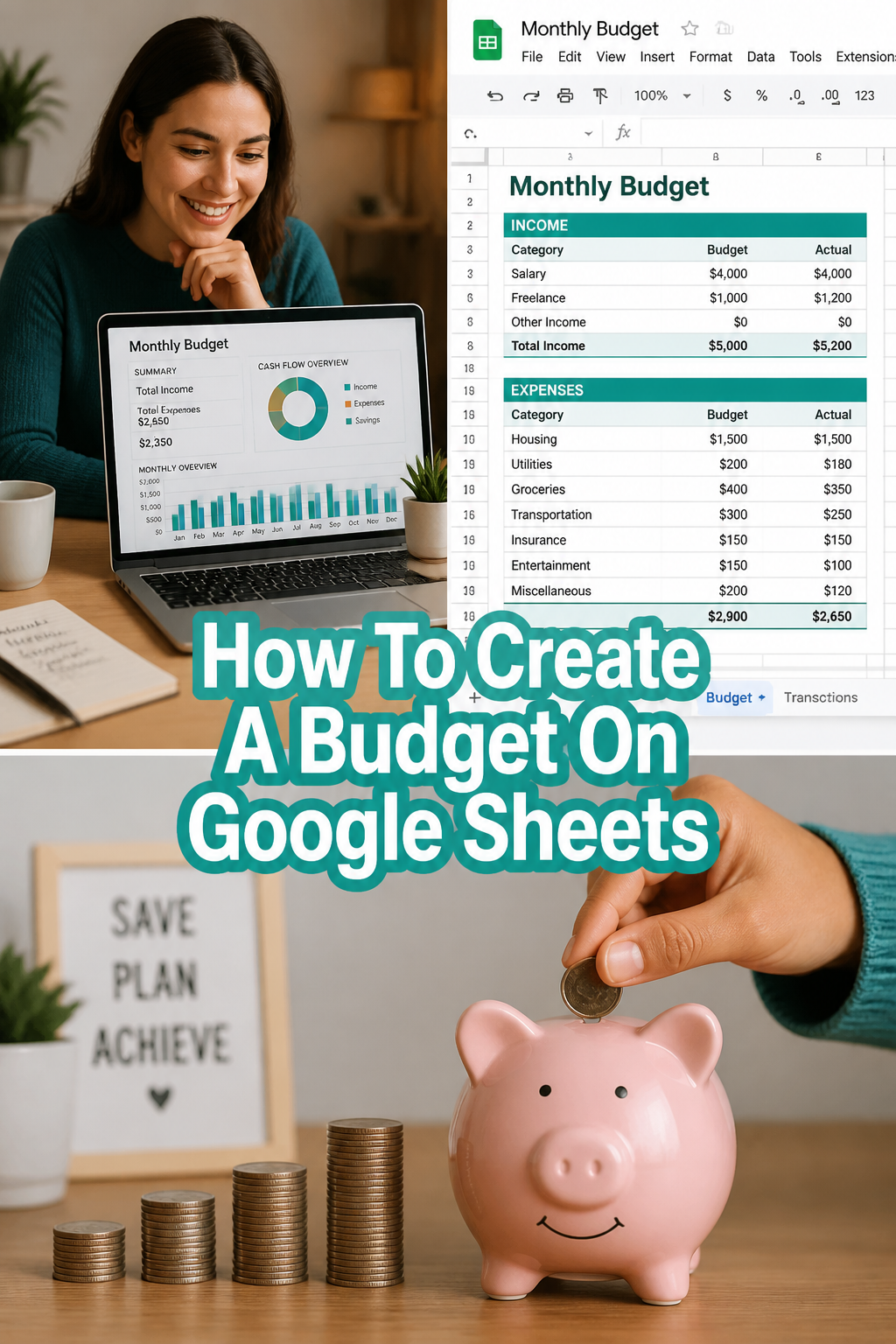
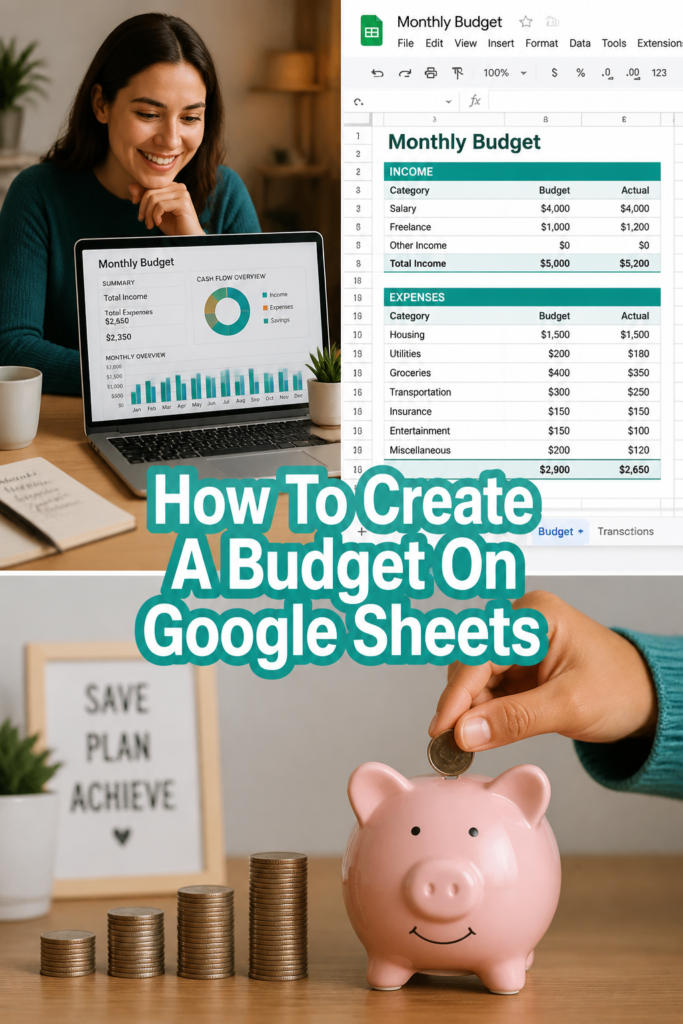
💰 How To Create A Budget On Google Sheets
📚 The Financial Literacy Library
The best investment you can ever make is in your own financial education. These 5 cornerstone books are what millionaires, financial advisors, and wealth-builders universally recommend for completely rewiring how you think about earning, saving, and investing money.
🧠 The Psychology of Money
Doing well with money isn't necessarily about what you know—it's about how you behave. Morgan Housel masterfully breaks down the emotional and psychological biases that secretly dictate our financial decisions, offering a true paradigm shift in how to view wealth.
🏠 Rich Dad Poor Dad
The #1 personal finance book of all time for a reason. This foundational read shatters the myth that you need to earn a high income to be rich, teaching you the critical difference between working for money and making your money work for you via assets.
📈 Atomic Habits
While not strictly a finance book, building wealth is absolutely dependent on the daily habits you cultivate. James Clear provides the definitive framework for breaking bad spending habits and effortlessly automating the good ones that lead to long-term success.
📊 The Simple Path to Wealth
The ultimate antidote to complex, intimidating financial advice. JL Collins provides an incredibly accessible, low-stress roadmap to financial independence through index fund investing, perfectly explaining why simplicity beats Wall Street complexity every time.
💳 I Will Teach You to Be Rich
A tactical, no-BS, 6-week program that actually works. Ramit Sethi teaches you how to crush debt, automate your savings, and negotiate your salary—all while guilt-free spending on the things you truly love. A must-read for modern money management.
I remember feeling completely lost when it came to money. Bills piled up, savings felt impossible, and I had no idea where my cash was actually going. Then I discovered the magic of Google Sheets for budgeting, and it truly transformed my financial life.
This guide isn’t just about numbers; it’s about gaining clarity, building confidence, and setting yourself on a path to genuine financial freedom. I’ll share the exact steps I used, along with practical tips I’ve learned along the way. Get ready to take charge of your money, once and for all.
Quick Overview
Creating a budget in Google Sheets will give you a clear, personalized snapshot of your finances. You’ll track income, monitor spending, and identify areas to save, all within a flexible, free tool. This isn’t just about cutting back; it’s about making informed choices that align with your goals.
- Time needed: 45-75 minutes for initial setup, 15 minutes weekly for updates
- Difficulty: Beginner
- What you’ll need: A Google account, internet access, basic understanding of your monthly income and expenses
Step-by-Step Instructions
Step 1: Set Up Your Budget Workbook
First, you need a fresh canvas. Open your web browser and go to sheets.google.com. Click on “Blank” to start a new spreadsheet.
Immediately, name your spreadsheet something clear like “My Personal Budget – [Current Year]”. This helps you stay organized. A good naming convention prevents confusion later on.
Rename the first sheet tab at the bottom to “Overview” or “Monthly Budget.” This will be your main dashboard.
Pro Tip: Create separate tabs for different months or years as you go. For example, “Jan 2024,” “Feb 2024.” This approach keeps your data tidy and makes historical comparisons much easier. You can always duplicate a blank template for new months.
Step 2: List Your Income Sources
Now, let’s look at what’s coming in. In your “Monthly Budget” tab, dedicate a section for “Income.” Start in cell A1 and type “Income.”
Below that, list every source of money you expect to receive each month. This might include your primary salary, freelance payments, side hustle earnings, or even rental income. Be as specific as possible.
In the column next to each income source (e.g., cell B2), input the net amount you expect to receive. This means the money after taxes, deductions, and anything else is taken out. Focus on the actual cash hitting your bank account.
Pro Tip: If your income varies, use an average from the past few months. Alternatively, budget conservatively by using your lowest expected income. This prevents overspending and builds a buffer.
Step 3: Categorize Your Expenses
This is where many people get overwhelmed, but we’ll break it down. Below your income section, create a new section for “Expenses.” This often starts around row 10 or 15.
Divide your expenses into logical categories. Think about big buckets like Housing, Transportation, Food, Utilities, Debt Payments, Personal Care, Entertainment, and Savings/Investments. You can get more granular within these if you wish.
Within each main category, list specific items. For example, under “Housing,” you might have Rent/Mortgage, Renter’s Insurance, and Maintenance. Under “Food,” you’d list Groceries and Dining Out.
Pro Tip: Think of expenses in three types: Fixed (same every month, like rent), Variable (changes, like groceries), and Discretionary (optional, like entertainment). Knowing the difference helps you identify areas to adjust quickly.
Step 4: Input Your Budgeted Amounts
Now, assign a target amount for each expense category. In the column next to your expense list, enter the amount you plan to spend. This is your “Budgeted” column.
Be realistic with these numbers. If you know you spend $500 on groceries, don’t budget $200 just because you wish you did. The goal is accuracy first, then optimization.
For fixed expenses, this is easy. For variable ones, estimate based on past spending. Look at your bank statements or credit card bills from the last 2-3 months to get a good average. This data is your friend.
Pro Tip: Don’t forget irregular expenses like annual subscriptions, car maintenance, or gifts. Create a separate line item and divide the annual cost by 12 to save a small amount each month. This prevents budget shocks.
Step 5: Track Your Actual Spending
This step is crucial for making your budget work. Create a new column next to your “Budgeted” column, labeled “Actual.” This is where you’ll record what you actually spend.
As you spend money throughout the month, enter the amount in the “Actual” column next to the corresponding category. For example, when you buy groceries, put the amount under “Groceries – Actual.”
You can do this daily, every few days, or once a week. The more frequently you update, the clearer your picture will be. Consistency here is far more important than perfection.
Pro Tip: Link your bank or credit card accounts to a free app like Mint or YNAB to automatically categorize transactions. Then, you can quickly import or reference these totals into your Google Sheet weekly, saving manual entry time.
Step 6: Calculate Your Totals and Differences
Now for the numbers game! At the bottom of your “Income” section, use the `SUM` formula to add up all your income. Type `=SUM(B2:B5)` (adjust cell range as needed) in a cell like B7. Label this “Total Income.”
Do the same for your “Budgeted” expenses. Sum all the amounts in your “Budgeted” column. Label this “Total Budgeted Expenses.” Repeat for your “Actual” expenses, labeling it “Total Actual Expenses.”
Next, calculate your “Difference.” Subtract your “Total Budgeted Expenses” from your “Total Income.” This shows if your planned spending is more or less than your income. A positive number means you have money left over.
Then, calculate the “Actual Difference” by subtracting “Total Actual Expenses” from “Total Income.” This tells you your true financial standing for the month. These differences are powerful insights.
Pro Tip: Use conditional formatting to highlight overspending. Select your “Actual” column, go to Format > Conditional formatting, and set a rule that turns cells red if the “Actual” amount is greater than the “Budgeted” amount for that category. This gives you instant visual feedback.
Step 7: Review and Adjust Your Budget
A budget isn’t a one-and-done task; it’s a living document. At the end of each month, or even mid-month, review your “Actual” spending against your “Budgeted” amounts. Where did you go over? Where did you save?
Identify trends. Maybe you consistently spend more on dining out than you planned. This isn’t a failure; it’s an opportunity to adjust. You can either allocate more to dining out next month or find ways to cut back.
Make conscious decisions for the next month. Perhaps you need to reduce a discretionary category to increase your savings goal. Or maybe a fixed expense increased, requiring adjustments elsewhere.
Pro Tip: Consider the 50/30/20 rule as a guideline. 50% of your income for Needs (housing, utilities, groceries), 30% for Wants (dining out, entertainment), and 20% for Savings and Debt Repayment. It’s a great starting point for balancing your budget.
Step 8: Set Financial Goals and Track Progress
Your budget is a tool to achieve your dreams. Identify 1-3 short-term and long-term financial goals. This could be building an emergency fund, saving for a down payment, or paying off a specific debt.
Integrate these goals into your budget. Create a “Savings Goal” category and dedicate a specific amount to it each month. Seeing this line item helps you prioritize and stay motivated.
On a separate tab, or even within your main sheet, track your progress toward these goals. Celebrate small wins! Seeing your emergency fund grow or your debt shrink is incredibly motivating.
Watching your net worth increase over time, even slowly, reinforces positive financial habits. This helps shift your mindset from just managing money to actively building wealth.
Common Mistakes to Avoid
Being Too Restrictive
Trying to cut every single discretionary expense from the start is a recipe for disaster. It leads to burnout and makes you feel deprived, often resulting in giving up entirely. A sustainable budget has room for fun.
Instead, find a balance. Start by identifying areas where you can comfortably reduce spending without feeling overly restricted. Small, consistent cuts are more effective than drastic, short-lived ones. Allow yourself some wiggle room for enjoyment.
Not Tracking Every Penny
It’s easy to overlook small transactions like daily coffees or impulse buys. These “mystery expenses” add up quickly and can throw your entire budget off track, leaving you wondering where your money went. An inaccurate picture is unhelpful.
Commit to tracking every single dollar, at least for the first few months. This level of detail helps you identify true spending patterns. Once you understand your habits, you can relax slightly, but don’t ignore the small stuff.
Ignoring Irregular Expenses
Annual subscriptions, holiday gifts, car repairs, and medical co-pays often get forgotten until they hit, causing major budget disruptions. These unexpected costs can make you feel like your budget is failing. Financial surprises are rarely pleasant.
Proactively plan for these. Estimate their annual cost, divide by 12, and set aside that amount monthly into a separate savings bucket. This way, when the expense arrives, the money is already there, stress-free.
Giving Up Too Soon
Budgeting is a skill, and like any new skill, it takes practice. You won’t get it perfect on the first try, and you’ll likely have months where you overspend. Feeling discouraged and abandoning your efforts is a common pitfall.
Remember that consistency beats perfection. If you have a bad month, simply review, adjust, and start fresh next month. Every time you engage with your budget, you learn more about your money habits and improve your financial literacy.
Troubleshooting
My Numbers Don’t Add Up
This is a common frustration, especially when you’re first starting. It often feels like a puzzle with missing pieces. Incorrect totals can make your budget seem useless.
First, double-check your `SUM` formulas. Ensure the cell ranges cover all your income and expense items correctly. Next, review your “Actual” spending entries. Did you miss recording any transactions? Are there any duplicate entries? Cross-reference with your bank statements line by line.
I Keep Overspending in a Category
It’s disheartening to consistently go over budget in the same area, like dining out or entertainment. This can make you feel like your budget is too restrictive or simply not working for you. It’s a sign that something needs a closer look.
Re-evaluate your budgeted amount for that category. Is it truly realistic? Perhaps you need to increase the budget there and cut back slightly in another, less critical area. Alternatively, explore creative ways to reduce spending in that category, like cooking more often or finding free entertainment options.
It Feels Overwhelming to Track Everything
The idea of logging every single transaction can seem like a daunting task, especially when you have a busy life. This feeling of being overwhelmed can lead to procrastination and eventually abandoning your budget altogether. Manual entry is a commitment.
Start small. Focus on tracking just your main categories for a week or two. Use bank exports as a shortcut; many banks allow you to download transactions as a CSV file, which you can then sort and sum in Google Sheets. You don’t have to input every single coffee if you can get a weekly total from your bank.
Key Takeaways
- Budgeting is a personal journey; your Google Sheet should reflect your unique financial situation and goals.
- Consistency in tracking your actual spending is far more important than achieving perfect accuracy from day one.
- Google Sheets offers incredible flexibility to customize your budget layout and formulas to suit your preferences.
- Regularly review and adjust your budget; it’s a living document that should adapt as your life and finances change.
- Connecting your budget to clear financial goals provides motivation and gives your money a purpose.
- Understanding where your money goes empowers you to make smarter financial decisions and build lasting wealth.
Frequently Asked Questions
How often should I update my budget?
For most people, updating your budget weekly is a great rhythm. This allows you to catch any overspending early and adjust course before it becomes a major issue. You can do a more thorough review and adjustment at the end of each month.
What if my income is irregular?
If your income varies significantly, consider using the “lowest income month” approach for your budget. This means you budget based on the lowest amount you expect to earn. Any extra income becomes a bonus, which you can direct towards savings or debt repayment. Another strategy is to average your income over the past 3-6 months.
Can I share my budget with my partner?
Absolutely! Google Sheets is designed for collaboration. Click the “Share” button in the top right corner, enter your partner’s email address, and grant them “Editor” access. This allows both of you to view and update the budget in real time, fostering teamwork and transparency in your financial journey.
Is Google Sheets secure for financial data?
Google employs robust security measures to protect your data, including encryption and two-factor authentication. While no system is entirely impenetrable, Google Sheets is generally considered a secure platform. Always use a strong, unique password and enable two-factor authentication for your Google account for added protection.
Our Top Recommended Finds
- A quality financial planner notebook: Sometimes, writing things down helps solidify your budget intentions before digitizing them. It’s a great companion to your digital sheet.
- A secure document scanner app: Use your phone to quickly digitize receipts for those cash transactions, making them easier to track in your Google Sheet later.
- A highly-rated personal finance book: Reinforce your budgeting journey with wisdom from financial experts. Books like “The Psychology of Money” can shift your entire perspective on wealth.
Your Path to Financial Freedom Starts Now
You’ve just laid the groundwork for a powerful financial tool. Creating a budget on Google Sheets isn’t just about tracking numbers; it’s about gaining control, making informed decisions, and building a foundation for your future. This is the first crucial step on your wealth-building journey.
Don’t let perfection be the enemy of progress. Your budget will evolve, and that’s perfectly normal. Stick with it, learn from your spending habits, and celebrate every small victory. Consider exploring topics like automating your savings or understanding basic investment concepts once you’re comfortable with your budget. The most important thing is to take action today.